py并发_fork创建子进程笔记

fork创建子进程

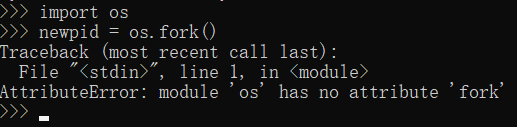
在之前的程序讲解之中都是通过具体的进程类实现了子进程的创建,相当于所有的子进程都是通过Python程序直接创建,提供的一个跨平台的支持(Python是跨平台的);但是除了以上的方式进行子进程创建之外,实际上还可以通过fork()函数形式来完成,如果要想使用这种方式进行子进程的创建,那么需要通过OS模块来完成,但是这种创建子进程的方式并不是跨平台形式的,因为fork()是在Linux环境下采用的一种子进程的创建方法,所以如果你在Windows系统里面可能是无法完成的。

windows系统不支持
Linux系统

获取python

  • Ubuntu系统 :apt-get -y install python3
  • CentOS系统:yum -y install python3

python文件

1
2
3
4
5
6
7
8
9
10
11
12
13
14
15
16
# coding: UTF-8
import multiprocessing as mtp,os #导入多进程开发模块
def child(): #子进程函数
print("[child()]父进程ID:%s、子进程ID:%s" %(os.getppid(),os.getpid()))
def main(): #定义执行的主函数
print("[main()]进程ID:%s、进程名称:%s" %(mtp.current_process().pid,mtp.current_process().name))
# fork有三种结果:创建失败(“<0”),子进程获取数据(“=0”),父进程获取数据(“>0”)
newpid = os.fork() #创建子进程
print("[fork()]新的子进程ID = %s"% newpid) #提示信息
if newpid == 0: #执行子进程
child() #子进程处理
else:
print("父进程执行,父进程ID:%s" %os.getpid())
if __name__ == "__main__":
main() #调用主函数

执行结果

1
2
3
4
5
6
7
ubuntu@VM-0-12-ubuntu:~/learnPython$ vi fork.py
ubuntu@VM-0-12-ubuntu:~/learnPython$ python3 fork.py
[main()]进程ID:22766、进程名称:MainProcess
[fork()]新的子进程ID = 22767
父进程执行,父进程ID:22766
[fork()]新的子进程ID = 0
[child()]父进程ID:22766、子进程ID:22767

fork()函数

我的理解:

  1. 在Linux/Unix平台可以使用os.fork()创建一个子进程

  2. fork方法创建的子进程的执行体代码是父进程fork所在区域执行体代码部分的复制,其实就是从fork()到这个执行体的末尾

    1
    2
    3
    4
    5
    6
    newpid = os.fork() #创建子进程
    print("[fork()]新的子进程ID = %s"% newpid) #提示信息
    if newpid == 0: #执行子进程
    child() #子进程处理
    else:
    print("父进程执行,父进程ID:%s" %os.getpid())
  3. fork创建的子进程再进行os.fork()的返回值是0,所以才可根据判断与父进程的执行不同


py并发_fork创建子进程笔记
https://blog.wangxk.cc/2020/01/15/py并发-fork创建子进程笔记/
作者
Mike
发布于
2020年1月15日
许可协议